If your business runs on bookings, whether that's a salon chair, a consulting call, a dental cleaning, or a demo slot, you already know the sale doesn't happen when someone lands on your site. It happens three or four steps later, after they've picked a service, found a time that works, and actually hit confirm. Most of the drop-off happens somewhere in between, and most businesses never see it. A booking funnel isn't one page, it's a short chain of decisions, and if you only look at your final conversion number, you're missing where people quit.
What a booking funnel actually looks like
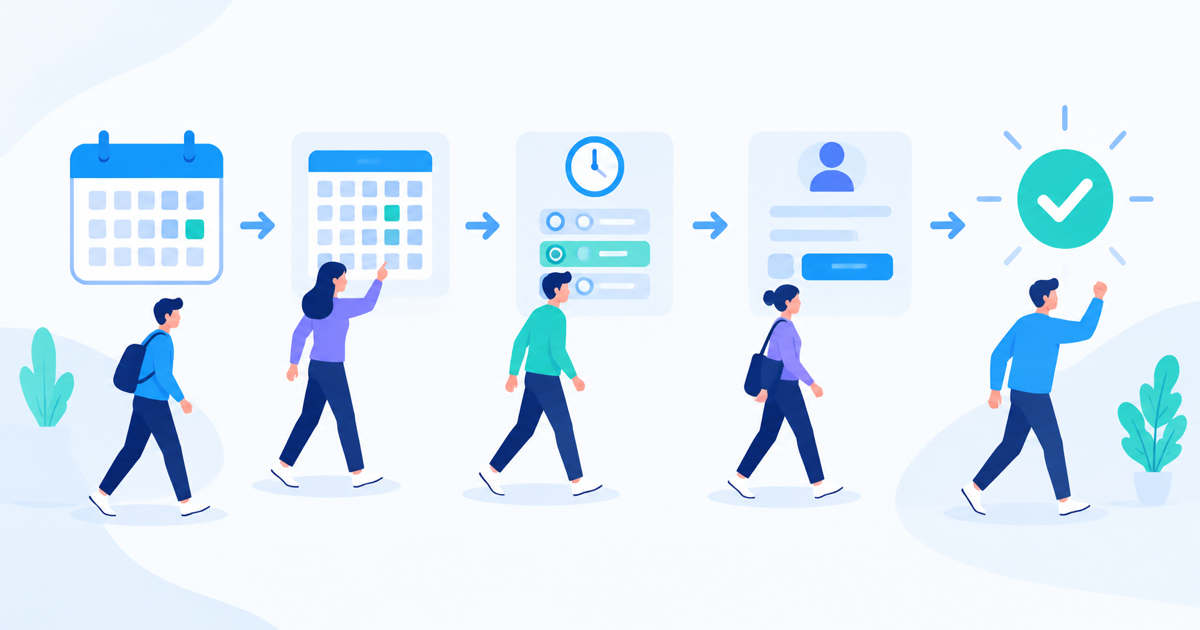
Strip away the design and most appointment flows follow the same shape: land on the page, choose a service or provider, pick a date and time, fill in contact details, and confirm. Four or five steps, sometimes compressed into one scrolling page, sometimes spread across a multi-step wizard with a calendar widget.
Each step is a place someone can leave. Someone opens the calendar and finds nothing available for two weeks, so they close the tab. Someone gets to the contact form and it asks for a phone number they don't want to give out yet. Someone picks a time, gets distracted, and never comes back to confirm. None of that shows up in a single "bookings this week" number. It only shows up when you treat the booking flow as a funnel with steps, not a form with a submit button.
Where appointment funnels actually leak
A few patterns show up again and again once you start watching real sessions instead of guessing from aggregate numbers.
- The calendar step. If your earliest available slot is more than a few days out, a chunk of visitors leave right there. Watching how long people scroll through a calendar before giving up tells you whether availability, not price or trust, is your real bottleneck.
- The "which service" step. Service menus that are too long or use internal jargon ("Deep Tissue 90 vs. Deep Tissue 60 Plus Add-On") cause people to open the same dropdown repeatedly, hesitate, and bounce.
- The contact details step. This is the most common silent killer. Asking for payment details, a full address, or an account signup before the appointment is even confirmed adds friction at the exact moment someone was ready to commit.
- The confirmation step. Sometimes the booking actually succeeds, but a slow confirmation page or a broken redirect makes the visitor think it failed, so they try again, create a duplicate booking, or give up and call a competitor instead.
None of these are visible in a conversion rate alone. You need to see the step-by-step path to catch them.
The booking didn't fail because of price or trust. It failed because the calendar took four seconds to load and the visitor assumed it was broken.
How to actually watch the drop-off happen
Setting up a funnel report is the right first move, mapping each step of your booking flow as an event so you can see the percentage that makes it from one stage to the next. That tells you which step loses the most people. What it doesn't tell you is why.
That's where session replay and heatmaps earn their place. Once you know the calendar step is losing 40 percent of visitors, watching a handful of real recordings of people hitting that exact step usually explains it within minutes. Maybe they're repeatedly clicking a date that looks selectable but isn't. Maybe they're switching between a "morning" and "afternoon" toggle five times because the label is unclear. A funnel chart tells you where. A recording tells you why. This is one of the reasons tools like LeadFnF pair session replay and heatmaps with lightweight funnel tracking rather than treating them as separate products, you want to move from "something's wrong here" to "here's exactly what's wrong" without switching tools or losing context.
Set up tracking without overbuilding it
You don't need a data team to track a booking funnel properly. A workable setup looks like this:
- Define four or five funnel steps that match your real flow: landed on booking page, selected service, selected date and time, submitted contact info, confirmed booking.
- Track each as a distinct event, not just page views, since many booking widgets never change the URL as users move through steps.
- Segment by device. Mobile drop-off on calendar widgets is almost always worse than desktop, and the fix is often just a bigger tap target or a simpler date picker, not a redesign.
- Watch session recordings specifically filtered to the step with the steepest drop, rather than randomly sampling sessions across your whole site.
Because this kind of tracking runs on a small script with privacy-first defaults, you're not stitching together a heavyweight analytics stack just to answer "where do people stop booking." A single lightweight script that captures funnel steps, heatmaps, and replays at once keeps the setup simple enough that a solo business owner or a small marketing team can actually maintain it.
Turning the data into fewer missed appointments
Once you can see the leak, the fixes tend to be small and specific rather than a full redesign. If the calendar step is the problem, shortening the booking window or showing same-day availability more prominently often recovers a meaningful share of drop-offs. If the contact form is the leak, moving the phone number field to after confirmation, or marking it optional, is usually enough. If it's the service selection step, cutting the menu down to plain-language options and letting people refine later removes the hesitation entirely.
The point isn't to chase a perfect funnel. It's to stop guessing. Every appointment business loses some percentage of visitors between "interested" and "booked," and that's normal. What's not necessary is losing them to the same fixable step, week after week, because nobody ever looked closely enough to notice it was there.
If you're currently running appointments or bookings without any visibility into where people stop, that's the first gap worth closing, not another marketing channel, not another ad spend increase. Just a clear view of the handful of steps between a click and a confirmed appointment.
Want to see exactly where your own booking flow loses people? Try LeadFnF free and watch your first week of sessions.