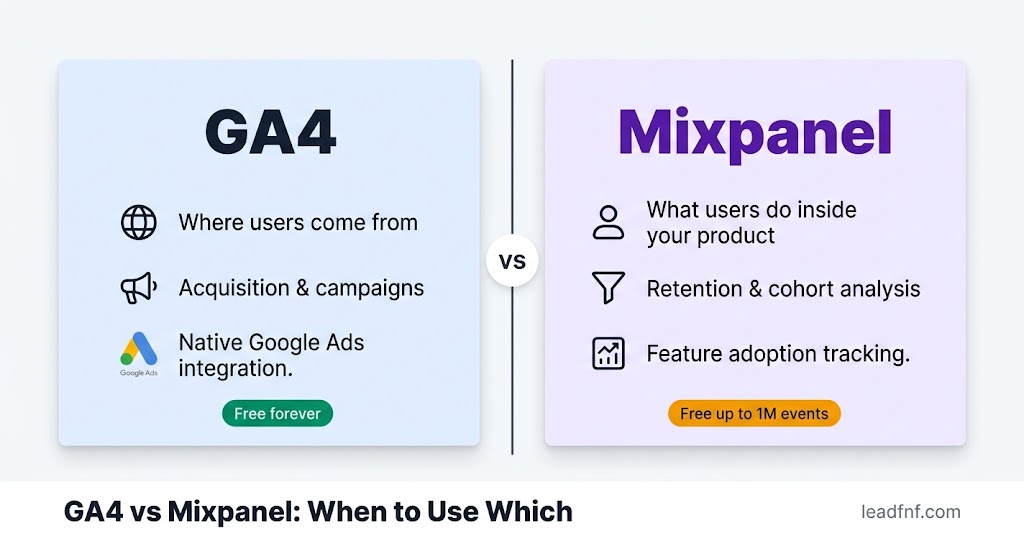

Most SaaS founders ask the wrong question when evaluating GA4 vs Mixpanel. The question is not "which is better?" They do fundamentally different things. The right question is: what problem are you actually trying to solve right now?
GA4 is a marketing analytics tool. It tells you where your users come from, which channels drive signups, and how your acquisition campaigns perform. It was built to serve Google's advertising ecosystem.
Mixpanel is a product analytics tool. It tells you what users do after they arrive — which features they adopt, where they drop off in your onboarding, and which behaviours predict retention versus churn.
One tool answers the acquisition question. The other answers the activation and retention question. For a small SaaS, both questions matter — but they don't both matter at the same stage, and you don't always need a dedicated tool for both.
This is the guide that helps you decide which one you need now, which one you can skip, and what to do when you need something neither of them provides.
Key Takeaways
- GA4 = acquisition analytics. Where do users come from? Which channels convert? How does paid traffic perform? GA4 was built for these questions (ClawAnalytics, February 2026).
- Mixpanel = product analytics. What do users do inside your product? Which features drive retention? Where does onboarding break? Mixpanel was built for these questions (Omtera, November 2025).
- Mixpanel's free tier covers 1 million monthly events — generous enough for any SaaS under ~50,000 monthly active users. Above that, Growth plan costs scale at $0.28 per 1,000 events — reaching $2,520/month at 10 million events (OpenPanel, December 2025).
- GA4's event model has hard technical limits that make deep product analytics difficult: 25 parameters per event, a 50 custom dimension cap, and a session-based architecture that struggles with cross-session user journeys (Redclawey, March 2026).
- Many teams run both — GA4 for marketing attribution, Mixpanel for product decisions. The cost is maintaining two tracking implementations and two sources of truth.
- Neither tool has session recordings or heatmaps that show you visually what users do. That gap is where LeadFnF fits: traffic analytics, session recordings, and heatmaps in one script, starting at $19/month.
Part 1: What GA4 Actually Is (And Where It Breaks Down for SaaS)
Google Analytics 4 is the free web and app analytics platform from Google, rebuilt in 2020 on a fully event-based data model. It replaced Universal Analytics in July 2023 and is currently the world's most widely deployed analytics tool.
What GA4 does well:
- Acquisition attribution — which channels (organic search, paid, social, referral, direct) drive traffic and conversions
- Campaign measurement — how Google Ads campaigns perform, which ad groups drive signups
- Traffic trends — how visitor volume changes over time, by channel, country, device
- Basic funnel analysis — multi-step conversion flows, though setup requires custom event configuration
- Audience creation — building remarketing audiences from behavioural data for Google Ads
Where GA4 breaks down for SaaS product analytics:
GA4 can handle basic product analytics — event tracking, simple funnels, user retention — but it falls short for the questions product teams actually need to answer. Specifically:
- 25 parameters per event limit — SaaS products often need to track complex event properties (plan type, feature variant, experiment group, user role) and hit this ceiling quickly
- 50 custom dimension cap — once you're building a real product with multiple feature areas, 50 dimensions runs out fast
- Session-based architecture — GA4 was originally designed around sessions (visits), not users. While GA4 has added user-level features, cohort analysis and cross-session user journeys remain cumbersome compared to Mixpanel's natively user-centric model (Redclawey, March 2026)
- No self-serve cohort analysis — building "users who completed onboarding in the last 14 days and didn't return in week 2" requires Exploration reports, complex event sequencing, and either time or a data analyst
- No feature adoption reporting — GA4 has no native way to show which percentage of your users have used Feature A vs Feature B in the last 30 days
GA4 answers where users come from. Mixpanel answers what they do after arriving. — ClawAnalytics, February 2026
For SaaS founders at the acquisition stage — trying to understand which traffic sources convert, whether paid campaigns are worth it, which landing pages drive signups — GA4 is genuinely the right tool, and the price (free) is unbeatable.
For SaaS founders at the activation and retention stage — trying to understand why users aren't getting value from the product — GA4 is the wrong tool.
Part 2: What Mixpanel Actually Is (And Where It Falls Short)
Mixpanel was founded in 2009 and built from the ground up for a single purpose: understanding what users do inside products. It has never tried to be an acquisition analytics tool. That focus is both its greatest strength and its primary limitation.
What Mixpanel does well:
- User-level event tracking — every event is attributed to a specific user, not a session. You can track what User A did across 47 sessions over three months.
- Funnel analysis — define any multi-step sequence and see exactly what percentage of users complete each step, with breakdown by cohort, device, or any property you track
- Retention analysis — day 1, day 7, day 30 retention curves by cohort, plan type, acquisition source, or any dimension
- Feature adoption — see what percentage of users have triggered each feature in any time window
- Behavioural cohorts — build segments like "users who completed onboarding but did not use Feature X in their first week" in seconds, without SQL
- Flows analysis — see the actual paths users take through your product, including unexpected routes and where they drop out
- Self-serve for non-technical teams — product managers can build funnels, retention charts, and segmented analyses without writing code
"Users who completed onboarding in the last 10 days but did not return in their second week" can be built in Mixpanel within seconds. — Omtera, November 2025
Where Mixpanel falls short:
- No marketing attribution — Mixpanel has no Google Ads integration, no organic search reporting, no traffic source analysis. You cannot use Mixpanel to understand where your users came from before they entered your product.
- Implementation overhead — Mixpanel requires deliberate event instrumentation. Every event you want to track must be explicitly defined and coded. This is more work than GA4's autocapture and is a real cost for small teams without a dedicated engineer.
- Pricing at scale — the free tier (1M events/month) is generous, but growth plan costs at $0.28/1,000 events above that threshold reach $2,520/month at 10M events (OpenPanel, December 2025). Add Group Analytics (essential for B2B SaaS), Data Pipelines, and extra session replays, and the bill can reach $4,000–4,500/month before you hit Enterprise.
- No heatmaps or session recordings at scale — Mixpanel's free tier includes 10K session replays per month. For any serious qualitative analysis, this caps quickly.
- No traffic analytics — you will still need a separate tool to understand your acquisition channels.
Part 3: The Core Philosophical Difference
The deepest difference between GA4 and Mixpanel is not features or pricing — it's how they think about users.
GA4 thinks in sessions. A session is a visit to your site. Everything is measured relative to sessions: sessions per user, conversion rate per session, bounce rate per session. This works well for marketing analytics where you care about visit-level behaviour.
Mixpanel thinks in users. A user is a persistent identity across all their interactions with your product. Everything is measured relative to users: events per user, retention per cohort, funnel completion per user segment. This works well for product analytics where you care about what individual people do over time.
For a SaaS product, this distinction matters practically. Your pricing page has a 42% conversion rate — but is that 42% of all sessions, including users who visited multiple times? Or 42% of unique users who ever visited? GA4 gives you the session answer by default. Mixpanel gives you the user answer.
Neither number is wrong. They answer different questions. Knowing which question you need answered most at your current stage is the decision.
Pre-product-market-fit: You're mostly asking acquisition questions. Which channels drive trials? Are your ads working? Where do signups come from? GA4 — or a simpler analytics tool — covers this.
Post-product-market-fit: You're mostly asking product questions. Why are users churning in week 2? Which features correlate with long-term retention? What does the activation path look like for converted users vs churned users? Mixpanel is built for these.
Part 4: Side-by-Side Comparison
| Feature | GA4 | Mixpanel | LeadFnF |
|---|---|---|---|
| Traffic source analytics | Yes — best-in-class | No | Yes |
| Google Ads integration | Native | No | No |
| User-level event tracking | Limited | Yes — core strength | Custom events |
| Funnel analysis | Complex setup | Yes — self-serve | Yes — built in |
| Retention / cohort analysis | Basic | Yes — core strength | No |
| Feature adoption reporting | No | Yes | No |
| Behavioural cohorts | No | Yes | No |
| Session recordings | No | 10K/month free | Yes — included |
| Click heatmaps | No | No | Yes — included |
| Cookieless by default | No | No | Yes |
| GDPR consent banner built in | No | No | Yes |
| AI plain-English insights | Predictive only | Spark AI (30 queries free) | Yes — included |
| Technical implementation | High | High | One script tag |
| Starting price | Free | Free (1M events) | $19/month |
| Cost at 10M events/month | Free | ~$2,520/month | $19/month (flat) |
Part 5: Mixpanel Pricing — The Real Numbers for Small SaaS
Mixpanel's free tier is genuinely generous and is one of the best free product analytics offerings available in 2026. Understanding when you'll outgrow it matters more than the headline price.
Free tier (as of May 2026):
- 1 million events per month
- Unlimited seats
- Core analytics: Insights, Funnels, Flows, Retention
- 10K session replays per month
- 30 Spark AI queries
- 5 saved reports per seat
- No Group Analytics, no Data Pipelines, no behavioural cohorts
Growth tier:
- First 1M events per month included free (requires credit card)
- $0.28 per 1,000 events above 1M — that is $0.00028 per event
- Practical costs: 5M events/month ≈ $1,120/month · 10M events/month ≈ $2,520/month · 20M events/month ≈ $5,320/month (OpenPanel, December 2025)
- Unlocks: unlimited saved reports, behavioural cohorts, formulas, Group Analytics (add-on)
What catches small SaaS teams:
The 1M event/month free tier sounds large. For a product with 5,000 monthly active users who each trigger 50 trackable events per session across 4 sessions per month, that's already 1 million events (5,000 × 50 × 4 = 1,000,000). A product with 10,000 MAUs and a richer event schema hits 2–5 million events with ease.
The other hidden cost: Group Analytics — the feature that lets you analyse by company or account rather than individual user — is essential for B2B SaaS and is a paid add-on on top of the Growth plan. For a B2B SaaS founder who wants to understand which accounts are at risk of churning, this is not optional.
The free tier is good for proving value, not for staying comfortable forever. If your dashboards are already in weekly product reviews, you've probably outgrown the free tier even if your traffic looks modest. — Usercall, May 2026
Part 6: The 4 Scenarios — Which Tool You Actually Need
Scenario 1: Pre-launch or pre-revenue
You're building your product. You haven't launched yet or you have fewer than 100 users.
What you need: Basic traffic tracking to know who's finding your site and from where. Nothing more.
Use: GA4 (free) or Plausible ($9/month if you want GDPR-friendly). Skip Mixpanel entirely — there's not enough product usage data to make it valuable, and the instrumentation work costs more than the insight.
Skip: Mixpanel until you have meaningful user activity to analyse.
Scenario 2: Early traction (100–2,000 users, pre-PMF)
You have users. Some are activating. Many are churning. You're trying to understand what separates the good sessions from the bad ones.
What you need: The ability to watch what users are actually doing — both quantitatively (which steps of onboarding do users complete?) and qualitatively (what does a churned user's first session look like?).
Use: Mixpanel free tier for funnel and retention analysis. LeadFnF for session recordings and heatmaps to see the why behind the funnel numbers.
Skip: GA4's advanced configuration — at this stage, you care about what users do in your product, not detailed acquisition attribution.
Scenario 3: Growth stage (PMF found, scaling acquisition)
You've found product-market fit. Users who activate stay. Now you're trying to pour fuel on acquisition: which channels bring the users who actually convert and retain? Which campaigns drive trial signups that become paying customers?
What you need: Strong acquisition attribution linked to downstream product behaviour.
Use: GA4 for acquisition measurement. Mixpanel for product behaviour analysis. Both, running together — GA4 for the "where did they come from?" question, Mixpanel for the "what did they do after?" question.
The cost: Two tracking implementations to maintain, two data sources to reconcile, and potential inconsistencies between the two. Factor this into your engineering budget.
Scenario 4: Revenue-focused optimisation
You're profitable or well-funded. Your focus is improving conversion at every stage — landing page to trial, trial to paid, paid to retained. You need both quantitative funnels and qualitative behaviour insight.
Use: GA4 or a paid acquisition analytics tool, Mixpanel Growth, and a session recording tool like LeadFnF. Or evaluate whether a product like PostHog — which combines product analytics, session replay, feature flags, and A/B testing — is worth the migration.
Part 7: Can You Run Both GA4 and Mixpanel Together?
Yes. Many SaaS companies run both simultaneously. It's the most common setup for teams of 5–20 people who have outgrown single-tool analytics.
The typical split:
- GA4 handles marketing attribution, traffic reporting, Google Ads conversion tracking, and audience creation for remarketing
- Mixpanel handles product analytics: funnel analysis, retention, feature adoption, cohort comparisons
The real costs of running both:
- Two tracking implementations — every new event must be instrumented in both tools (or you accept that the data differs between them)
- Two sources of truth — user counts, session counts, and conversion rates often differ between GA4 and Mixpanel due to different data models and attribution logic. Reconciling them becomes a recurring engineering and data task
- Two dashboards — teams split their attention and may draw conflicting conclusions from the two data sets
- Data inconsistency debates — "GA4 shows 1,200 signups this month but Mixpanel shows 1,080. Which is right?" This is a recurring question in teams running both tools.
For a small SaaS team of 1–5 people, this complexity is often not worth it. Start with one tool that answers your most pressing question. Add the second when you have a dedicated person to maintain both.
If budget is tight, start with GA4 and add Mixpanel later when your product analytics needs outgrow what GA4 can do. — ClawAnalytics, February 2026
Part 8: The Gap Both Tools Leave
Here is the honest thing that neither the GA4 vs Mixpanel comparison nor most analytics comparisons will tell you: both tools are completely blind to visual user behaviour.
GA4 tells you 58% of users abandon your onboarding at step 3. Mixpanel confirms it with a beautiful funnel chart and breaks it down by cohort. Neither tool can show you:
- What users are looking at on step 3 before they leave
- Whether they tried to click something and it didn't work
- Whether a field label was confusing
- Whether the step 3 UI looks completely different on a specific device
- What a frustrated user's cursor trail looks like right before they close the tab
For that, you need session recordings and heatmaps. And both GA4 and Mixpanel require you to bolt on a separate tool — Hotjar, Microsoft Clarity, or similar — adding another script, another bill, and another dashboard to manage.
LeadFnF was built to close this gap specifically for small SaaS teams. One script gives you:
- Traffic analytics — sessions, pageviews, sources, geography (the GA4 side)
- Session recordings — watch exactly what users did, with device frames for mobile and desktop
- Click heatmaps — see where users click on every page, separated by device
- Funnel analysis with AI commentary — the quantitative drop-off identified and explained in plain English
- User flow graphs — actual navigation paths, not predefined sequences
It doesn't replace Mixpanel's depth for cohort analysis or feature adoption tracking. But for the majority of SaaS founders who are still trying to understand why users aren't activating rather than which cohort's D30 retention is 4 points below benchmark — LeadFnF covers the most urgent question at a fraction of the combined tool cost.
Try it free for 14 days — no credit card, one script, session recordings live within 10 minutes.
Frequently Asked Questions
Is GA4 good enough for product analytics?
For basic product analytics at early stage — yes. Simple event tracking, basic funnel analysis, and first-pass retention data are all achievable in GA4. For serious product analytics work — cohort comparisons, behavioural segmentation, feature adoption, cross-session user journeys — GA4's limits become a real obstacle. The 25-parameter event cap, 50 custom dimension limit, and session-based architecture all create friction that Mixpanel was specifically designed to avoid.
Is Mixpanel free tier good enough for a small SaaS?
For a product with under 50,000 monthly active users and a lean event schema, yes — the 1 million monthly events free tier is likely sufficient. The constraint to watch: the free tier caps saved reports at 5 per user and excludes Group Analytics (essential for B2B SaaS), behavioural cohorts, and Data Pipelines. If your team is doing serious weekly analysis, you'll feel these limits within 3–6 months of using Mixpanel seriously.
Does Mixpanel replace GA4 for Google Ads tracking?
No. Mixpanel has no Google Ads integration. If you're running paid campaigns and need conversion data fed back into Google Ads for bidding optimisation, you need GA4 or Google Ads' native conversion tracking. Mixpanel cannot do this. Teams running paid acquisition almost always keep GA4 (or Google Ads conversion tags) alongside Mixpanel.
What's the difference between events in GA4 and events in Mixpanel?
Both track user actions as "events," but the data model is different. GA4 events are session-attributed by default — the event belongs to a session, which belongs to a user. Mixpanel events are user-attributed from the start — every event is tied directly to a user profile. This makes Mixpanel natively better for cross-session user journey analysis. GA4 can approximate this, but it requires more configuration and produces different results.
When should I start using Mixpanel?
When you have enough users that patterns are statistically meaningful — typically 500+ monthly active users — and when your primary question has shifted from "are people finding my site?" to "why aren't users adopting Feature X?" Before that threshold, the instrumentation overhead of Mixpanel costs more in engineering time than the insights are worth.
What if I want session recordings with my product analytics?
Mixpanel's free tier includes 10,000 session replays per month — useful for spot-checking but limited for systematic analysis. For serious qualitative analysis alongside your quantitative product analytics, you need a dedicated session recording tool. LeadFnF includes unlimited session recordings (based on your plan) alongside traffic analytics and heatmaps from one script, starting at $19/month.
The Decision Framework: One Question
Before installing either tool, answer this:
What is the single most important question I need my analytics to answer this month?
- "Where are my trial signups coming from?" → GA4
- "Which paid campaign is driving the best-quality users?" → GA4
- "Why are users churning in week 2?" → Mixpanel
- "Which features correlate with 90-day retention?" → Mixpanel
- "What are users actually doing on my pricing page?" → Session recordings (LeadFnF)
- "Why are users not clicking my CTA?" → Heatmaps (LeadFnF)
- "All of the above" → GA4 + Mixpanel + LeadFnF, accepted cost of complexity
Match your tool to your most urgent question. Don't install three analytics platforms when one answers the question that actually matters to you this quarter.
The Bottom Line
GA4 and Mixpanel are not competitors. They solve different problems, and a fast-growing SaaS eventually needs both. The mistake is installing both before you need both — or using the wrong one for the question you're actually trying to answer.
For a solo founder or a SaaS team under 10 people:
- Use GA4 if your primary focus is acquisition — understanding which channels drive signups and managing paid campaigns.
- Use Mixpanel's free tier when your primary focus shifts to activation and retention — understanding what users do inside your product and why they churn.
- Use LeadFnF when you need to see what users are actually doing on your site visually — the heatmaps and session recordings that both GA4 and Mixpanel are blind to, for $19/month.
The honest answer for most early-stage founders: start with one. Start with the tool that answers your most painful question today. You can always add the second tool when the first one stops being enough.
Try LeadFnF free for 14 days — traffic analytics, session recordings, and heatmaps from one script. No credit card required.