
Clarity is free. Hotjar is not. That's where most comparisons start and stop.
But if you've ever actually used both — not just read about them — you know the decision is messier than that. Clarity is genuinely impressive for a zero-cost tool. Hotjar (now part of Contentsquare after its July 2025 merger) has more depth, but depth costs money and comes with its own complications in 2026.
This is the comparison that gives you the real answer: what each tool actually does well, where each one falls short, the privacy tradeoffs most articles bury at the bottom, and the honest verdict for different types of users.
Key Takeaways
- Microsoft Clarity is completely free — unlimited session recordings, unlimited heatmaps, no session caps, no upgrade pressure. As of May 2026, all features remain free with no announced changes.
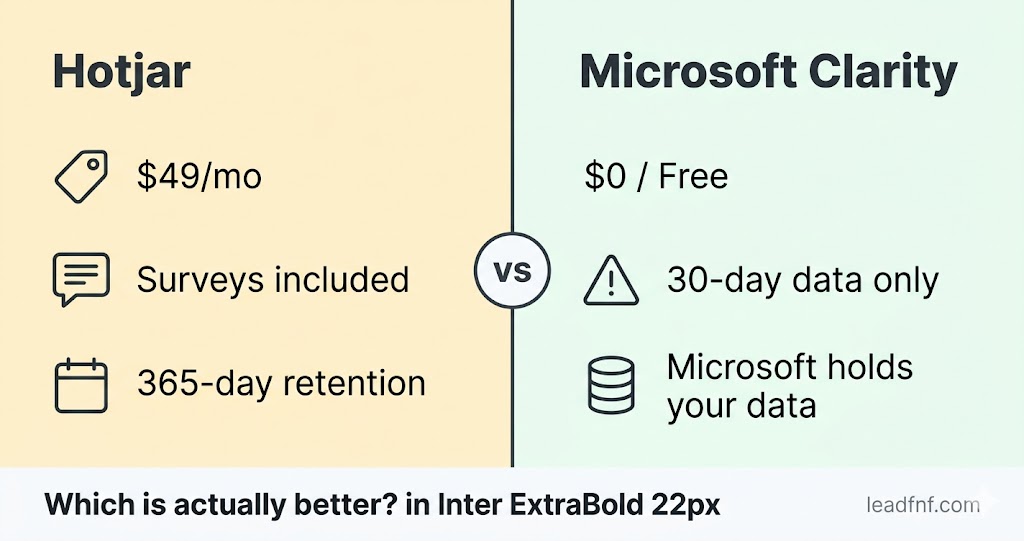
- Hotjar's paid plans start at $32–49/month (via Contentsquare after the July 2025 merger). The free tier is limited to 35 sessions/day.
- Clarity retains session recordings for only 30 days. Labeled or favorited sessions extend to 13 months. Hotjar retains data for 365 days on paid plans (Microsoft Learn, May 2026).
- Clarity does not respond to browser Do Not Track (DNT) signals — confirmed in Microsoft's own FAQ. Hotjar does.
- Hotjar's terms guarantee a free plan forever. Clarity's terms reserve the right to charge for features previously free at any time (UXHeat, February 2026).
- Neither tool includes traffic analytics. You still need GA4, Plausible, or a third tool to know where your users came from. LeadFnF is the only tool in this price range that combines session recordings, heatmaps, and full traffic analytics in one script.
What Microsoft Clarity Does
Microsoft Clarity launched in 2020 and quickly became the go-to free heatmap and session recording tool, particularly for smaller sites, agencies, and teams on tight budgets. Microsoft backs it, it keeps evolving, and in 2026 it genuinely delivers more than most people expect from a free tool.
What you get with Clarity, free, forever:
- Unlimited session recordings — no daily caps, no session limits, no upgrade required
- Click, scroll, and area heatmaps — automatically generated for every page, no setup
- Dead click and error click detection — unique to Clarity; highlights where users click on non-interactive elements and where JavaScript errors occur
- Rage click detection — flags frustrated users automatically
- Live recordings — watch users navigate your site in real time (up to 100 concurrent)
- Microsoft Copilot AI — summarises recordings and surfaces patterns using natural language; arguably the strongest AI feature of any free tool in this category
- Google Analytics integration — link sessions to GA4 data for source context
- Mobile app analytics — Clarity extended to iOS and Android apps, which Hotjar does not cover
- Segment filtering — filter sessions by device, browser, country, referrer, custom tags
Where Clarity falls short:
- 30-day recording retention. This is the biggest practical limitation. Session playback data is deleted after 30 days. Only sessions you manually label or favourite extend to 13 months (Microsoft Learn). If you want to revisit a session from six weeks ago, it's gone.
- No surveys or feedback widgets. If you want to ask users why they're leaving, you need a separate tool.
- No funnels. Clarity has no multi-step funnel analysis — you can't define a conversion sequence and see drop-off rates at each step.
- No traffic analytics. Clarity tells you what users did on your site but not where they came from, how many visited, or how traffic trends over time.
- Community-only support. There is no dedicated support team. Microsoft's terms explicitly state they are not obligated to provide support. For production sites, this is a real risk.
- DNT signals ignored. Clarity does not respect the browser's Do Not Track setting — a detail worth knowing if your audience cares about privacy (Microsoft FAQ).
- Microsoft's data terms. Your visitor data is stored in Microsoft Azure and, per Clarity's terms, Microsoft has rights to use it to improve their products. The Beantin analysis (September 2025) notes that Clarity's help pages do not clarify what happens to data shared internally within Microsoft's ecosystem — a meaningful grey area for privacy-conscious teams (Beantin.net).
What Hotjar Does (Post-Contentsquare Merger)
Hotjar merged into the Contentsquare Group on July 1, 2025. The product still works and existing dashboards still function, but the commercial layer has shifted — hotjar.com/pricing now redirects to Contentsquare's pricing page. If you're evaluating Hotjar in 2026, you're essentially buying a product in mid-rebrand.
What Hotjar gives you:
- Session recordings — full playback with mouse movement, clicks, scrolls, and frustration signals
- Click, scroll, and move heatmaps — with stronger segmentation than Clarity (filter by traffic source, device, date range, user attributes)
- Surveys and feedback widgets — the "Ask" product lets you deploy on-site polls, exit-intent surveys, and NPS questions. This is the biggest functional difference from Clarity.
- Conversion funnels — define multi-step flows and see where users drop off at each step (Growth plan and above)
- Rage-click and u-turn detection — similar to Clarity's frustration signals
- 365-day data retention on paid plans — a full year vs Clarity's 30 days
- Do Not Track respect — Hotjar honours browser DNT signals
- Dedicated support — real humans, even on free plans
- Guaranteed free plan — Hotjar has committed publicly to maintaining a free tier, unlike Clarity's terms
Where Hotjar falls short:
- Price. The free tier caps at 35 session recordings per day. For any serious volume, you're on a paid plan: $32–49/month (Growth, annual billing via Contentsquare). Business and Scale tiers run $99–213/month.
- No mobile app analytics. Hotjar is web-only; it has no iOS or Android SDK.
- No traffic analytics. Same gap as Clarity — Hotjar tells you what users do, not where they came from or how traffic trends over time.
- Merger uncertainty. With Hotjar now fully inside Contentsquare, the product roadmap, pricing, and feature set are less predictable than they were 18 months ago. Teams already using Hotjar have reported migration pressure and pricing surprises during the transition.
- AI features are weaker. Hotjar's AI summarisation ("Trends") is less capable than Clarity's Copilot integration, according to independent comparisons (Tool Decision Engine, March 2026).
Hotjar vs Microsoft Clarity: Side-by-Side
| Feature | Microsoft Clarity | Hotjar |
|---|---|---|
| Price | Free — always | Free (35 sessions/day) · Paid from $32/mo |
| Session recordings | Unlimited | 35/day free · unlimited paid |
| Heatmaps (click, scroll) | Yes | Yes |
| Move heatmaps | No | Yes |
| Dead click / error click heatmaps | Yes (unique) | No |
| Rage click detection | Yes | Yes |
| Live recordings | Yes (100 concurrent) | No |
| Surveys / feedback widgets | No | Yes (Ask product) |
| Funnel analysis | No | Growth plan+ |
| AI insights | Copilot (strong) | Basic |
| Mobile app analytics | iOS + Android | No |
| Google Analytics integration | Native | Manual |
| Traffic analytics | No | No |
| Data retention (recordings) | 30 days | 365 days (paid) |
| Do Not Track (DNT) respect | No | Yes |
| Dedicated support | Community only | Yes — all plans |
| Free plan guaranteed | Not guaranteed in terms | Committed publicly |
| Data ownership | Microsoft's terms apply | You own your data |
| Self-hosting | No | No |
The Privacy Reality in 2026
Both tools require a consent banner for EU visitors — this is no longer optional. Microsoft Clarity introduced a mandatory consent signal deadline of October 31, 2025 for sites with EEA, UK, and Swiss visitors. Sites that failed to implement a consent signal by that date had Clarity's features partially disabled for those users (CookieHub, October 2025).
So the "free and frictionless" narrative around Clarity has a real asterisk in 2026: if you have EU traffic, you need a Consent Management Platform (CMP) regardless, which adds cost and complexity.
The deeper privacy concern with Clarity is its terms. Per Mouseflow's March 2026 analysis, your visitor data is stored in Microsoft Azure and may be used to improve Microsoft's AI systems. Clarity does not sell data, but you don't fully own it the way you would with a paid SaaS tool where you sign a Data Processing Agreement specifying your rights.
For GDPR-conscious teams, the honest ranking is:
- Cookieless tools (Plausible, LeadFnF basic analytics) — no consent banner needed at all
- Hotjar — clear data ownership, DNT respected, DPA available
- Clarity — compliant when configured correctly, but Microsoft's data rights and absent DNT support introduce grey areas
Who Should Use Clarity?
Clarity is the right choice if:
- You are cost-constrained and need session recordings and heatmaps at zero cost
- You run a content site, blog, or marketing page where 30-day retention is acceptable — most insights are actioned within a week anyway
- You want AI-powered session summaries without paying for them (Copilot is genuinely useful)
- You're running Google Ads and want native session-to-GA4 linking
- You need mobile app analytics — Clarity is the only free tool that covers iOS and Android
- You can tag important sessions within 30 days before they expire
Clarity is probably not enough if:
- You need to revisit recordings older than 30 days — a bug report six weeks later means the session is gone
- Your team runs user research sprints that span multiple weeks
- You care about data ownership and don't want your visitors' behavioural data inside Microsoft's ecosystem
- You need surveys or on-site feedback tools
- You need conversion funnel analysis
Who Should Use Hotjar?
Hotjar is the right choice if:
- You need surveys and feedback widgets — this is Hotjar's clearest differentiator in 2026
- You need long-term session retention — 365 days vs Clarity's 30 days
- You run iterative user research where sessions need to be revisited weeks or months later
- You want dedicated support you can actually reach
- You need a clean data processing agreement and confirmed data ownership
- DNT signal compliance matters to your legal or privacy team
Hotjar is harder to justify if:
- You are pre-revenue or bootstrapped and the $32–49/month is a real cost
- You only need basic heatmaps and recordings — Clarity covers this free
- You are affected by the Contentsquare migration uncertainty and don't want pricing surprises in 2026
The Gap Neither Tool Fills
Here is what no Hotjar vs Clarity comparison will tell you directly: both tools show you what users do on your site, but neither tells you where those users came from, how many came in total, or how those numbers trend over time.
You still need a separate analytics tool — GA4, Plausible, or similar — to get traffic data. That means a second script on your page, a second dashboard to check, and data that never quite connects to your session recordings.
If you're a SaaS founder, indie hacker, or small team and you want to stop managing two separate tools, LeadFnF was built for exactly that situation. One script gives you:
- Full traffic analytics — sessions, pageviews, sources, geography, device breakdown
- Session recordings — watch exactly what every user did, with mobile and desktop device frames
- Click heatmaps — separated by device type so mobile and desktop don't blur
- User flow graphs — see actual navigation paths between pages
- Funnel analysis with AI commentary — plain English explanation of your biggest drop-off
- Built-in GDPR consent banner — no third-party CMP required
- Cookieless by default — no consent needed for basic analytics
All from one script, starting at $19/month. 14-day free trial, no credit card.
How to Decide: The 3-Question Framework
Question 1: Do you need surveys or long-term session storage?
- Yes → Hotjar. Clarity cannot do this.
- No → continue to question 2.
Question 2: Is cost a constraint?
- Yes → Clarity. It is genuinely free and genuinely good.
- No → continue to question 3.
Question 3: Do you also need traffic analytics?
- Yes → neither Hotjar nor Clarity solves this. Consider LeadFnF (all-in-one) or pair Plausible with Clarity (two tools, but both affordable).
- No → Clarity for free, Hotjar if you need depth.
Frequently Asked Questions
Is Microsoft Clarity really free forever?
As of May 2026, yes — all features are free with no announced plans to charge. However, Clarity's terms of service state that Microsoft may charge additional fees for features previously provided for free at any time. Hotjar has made a public commitment to a free plan permanently. The risk of Clarity charging is low but not zero (UXHeat, February 2026).
Can you run Hotjar and Microsoft Clarity at the same time?
Yes. Many teams do — Clarity for free broad coverage, Hotjar for specific research sprints or surveys. Just ensure your privacy policy discloses both tools and that cumulative script load time remains acceptable.
Does Microsoft Clarity work with Shopify?
Yes. Clarity integrates directly with Shopify via a native app — no code required. Hotjar also works with Shopify via the script tag or its own Shopify integration.
Which has better heatmaps — Clarity or Hotjar?
For most use cases, they are functionally equivalent. Hotjar offers more segmentation options and move maps (where the mouse travelled). Clarity offers dead click and error click heatmaps that Hotjar doesn't have. For raw heatmap quality, the difference is negligible — both render accurate click and scroll data (UXHeat, February 2026).
Is Microsoft Clarity GDPR compliant?
It can be, if implemented correctly. Clarity requires explicit user consent before tracking EU visitors, and Microsoft introduced a mandatory consent signal deadline of October 31, 2025. With a proper CMP and Clarity's Consent API integrated, it is compliant. Without it, you risk GDPR breach. The cookieless alternative is to use an analytics tool that doesn't set cookies at all — see our GDPR session recording guide.
Which is better for SaaS products?
Hotjar, if you need surveys and user feedback as part of your research process. Clarity, if you only need recordings and heatmaps and cost matters. For SaaS founders who also want traffic analytics — where did signups come from, what's the funnel drop-off — neither tool is sufficient alone. See LeadFnF for a single-script alternative.
The Bottom Line
Clarity is absurdly good for a free tool. If you need basic session recordings and heatmaps and cost is a constraint, there is almost no reason not to use it. The limitations — 30-day retention, no surveys, no funnels, Microsoft's data terms — matter for some teams and are invisible for others.
Hotjar earns its price if you need surveys, long-term session storage, or data you fully own. The Contentsquare merger adds uncertainty, but the product itself remains solid.
The honest answer for most founders and small SaaS teams: start with Clarity, it costs nothing and you will learn something useful in the first hour. Upgrade to Hotjar (or a combined tool) when you hit a limitation Clarity cannot solve.
And if you want traffic analytics and session behaviour in the same dashboard — without the two-tool juggle — try LeadFnF free for 14 days. No credit card required.